
The Project Reminders feature in RISPER CRM allows users to send timely notifications to clients about ongoing or upcoming projects.
This ensures clients stay informed about project progress, deadlines, or required actions.
This feature is especially useful for:
- Accounting companies managing VAT filing tasks
- Business setup companies handling trade license applications or renewals
Accessing Project Reminders
- Log in to the CRM.
- From the left-side menu, click Projects.
- All projects will appear in table view. Each row shows:
- Project name
- Client
- Status (e.g., To Do, In Progress, Completed)
- Due date
Sending a Project Reminder
- In the project table, tick the Select checkbox next to the project(s) you want to remind clients about.
- Use Select All to send reminders for multiple projects simultaneously.
- Click the Send Reminder button above the table.
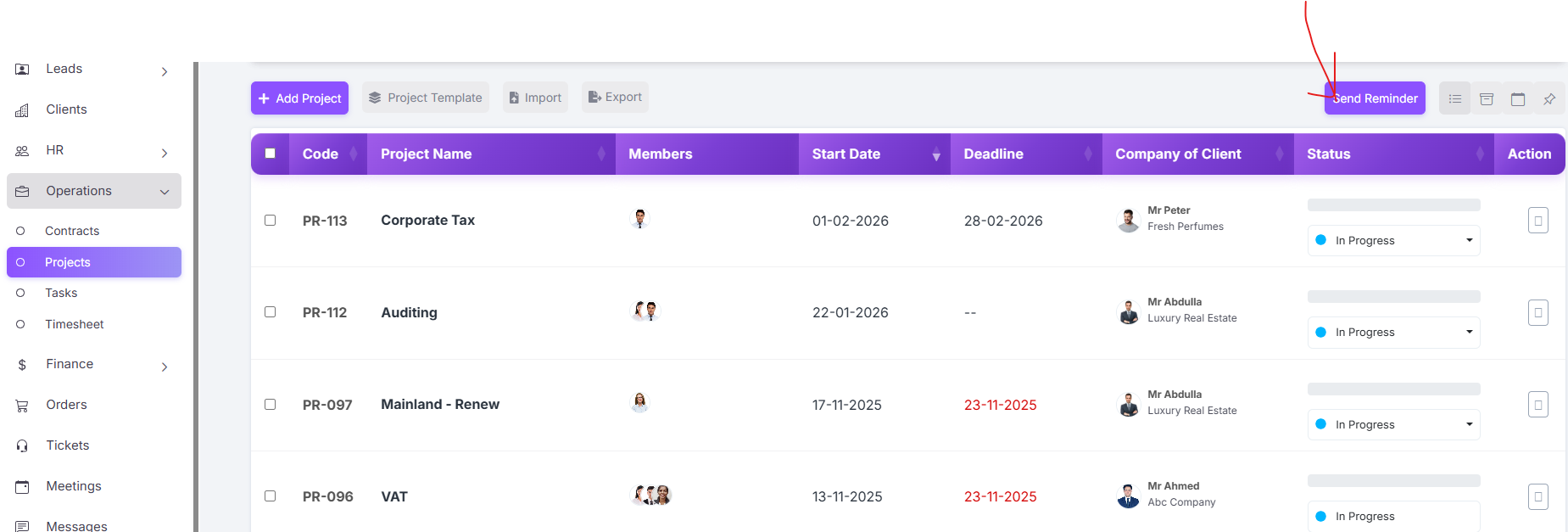
The system will send a customized reminder email to the client associated with the project.
The email includes project name, current status, and due date.
4. Multiple reminders can be sent as needed, based on project status or urgency.
Note: You can send reminders for projects that are pending, upcoming, or in progress.
Examples – Accounting & Business Setup Projects
Example 1:
Accounting Company – VAT Filing Project
- Project Name: VAT Filing – Client A
- Client: Abdullah & Co.
- Status: In Progress
- Deadline: February 5, 2026
Steps to Send Reminder:
- Navigate to Projects → Table View.
- Find VAT Filing – Client A.
- Tick the checkbox and click Send Reminder.
Result:
Client receives an automated email:
The client is now aware of the project status and upcoming deadlines.
Example 2:
Business Setup Company – New Trade License
- Project Name: New Trade License – Client B
- Client: Emirates Tech Solutions
- Status: To Do
- Deadline: February 15, 2026
Steps to Send Reminder:
- Select the project in the Projects table view.
- Click Send Reminder.
Result:
Client receives an email notifying them of pending documents or required action for their trade license application.
Example 3:
Business Setup Company – License Renewal
- Project Name: License Renewal – Client C
- Client: Star Enterprises
- Status: Upcoming
- Deadline: March 1, 2026
Steps to Send Reminder:
Select the project in the Projects table view.
Click Send Reminder.
Result:
Client receives a reminder email:
Benefits of Using Project Reminders
Proactive Communication: Clients are informed without manual follow-ups.
Efficiency: Reduces time spent on calls or individual emails.
Customizable: Send reminders for specific projects, multiple projects, or based on project status.
Transparency: Clients can track project progress, increasing satisfaction and trust.
Summary:
The Project Reminders feature in RISPER CRM ensures that clients are always informed about their VAT filing, new trade license, or license renewal projects.
You can select individual or multiple projects and send automated reminders, keeping communication professional and timely.