
The Attendance Settings section allows administrators to configure attendance rules, employee shifts, shift rotations, and QR-based clock-in methods. These settings help streamline attendance tracking and ensure compliance with company policies.
Administrators can define general attendance policies, including:
- Allow Employee to Request Shift Change – Employees can request a change in their assigned shift.
- Save Clock-In Location – Stores the geographical location of each clock-in event.
- Allow Employee Self Clock-In/Clock-Out – Employees can log their attendance independently.
- Auto Clock-In Employee by First Sign-In – Automatically marks attendance upon the first login of the day.
- Clock-In Check with Added Location Radius – Requires employees to be within a specific area to clock in.
- Allow Clock-In Outside Shift Hours – Enables employees to log attendance beyond assigned shift hours.
- Clock-In Check with Added IP Address – Restricts attendance logging to specific IP addresses.
- Send Monthly Attendance Report Email – Sends a summary of attendance data via email.
- Week Starts From – Defines the starting day of the workweek (e.g., Monday).
- Attendance Reminder Status – Enables automatic attendance reminders.
Once the settings are adjusted, administrators must Save the changes.
Employee Shifts
This section allows the management of employee shifts, including:
- Shift Start Time – The official start time for the shift.
- Half-Day Mark Time – Midpoint of the shift, used for attendance tracking.
- Shift End Time – The official end time for the shift.
- Late Mark After (Minutes) – Defines how many minutes after the start time an employee is considered late.
- Maximum Check-Ins Allowed Per Day – Limits the number of clock-ins an employee can register.
- Office Open Days – Specifies the days on which the office operates.
Adding a New Shift
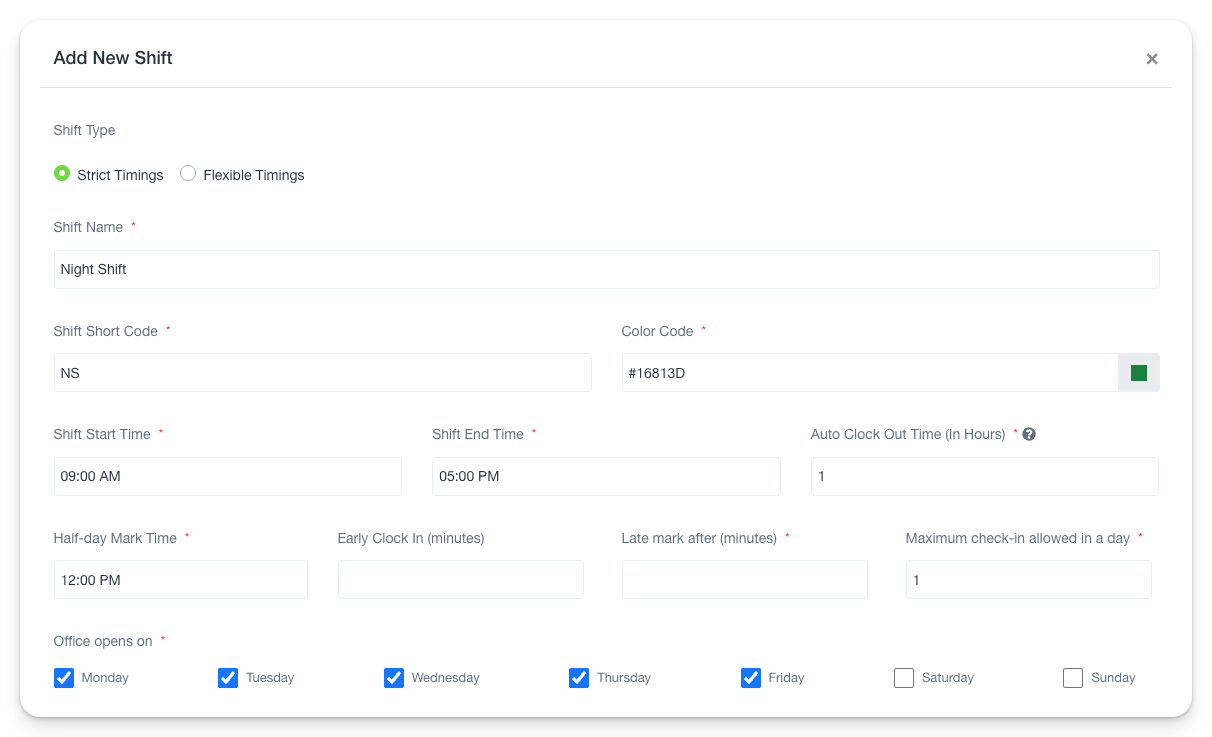
Administrators can manually create shifts with the following parameters:
- Shift Type – Choose between Strict Timings (fixed hours) or Flexible Timings (adjustable work hours).
- Shift Name & Short Code – Assign a unique name and code to the shift.
- Shift Start and End Time – Set the exact working hours.
- Half-Day Mark Time – Define the half-day attendance threshold.
- Early Clock-In (Minutes) – Specify how early employees can clock in before their shift starts.
- Late Mark After (Minutes) – Set the grace period before marking employees as late.
- Maximum Check-Ins Allowed Per Day – Determine the limit on clock-ins per day.
- Auto Clock-Out Time (Hours) – Set an automatic logout period post-shift completion.
- Office Open Days – Select applicable working days (Monday to Sunday).
Shift Rotation Tab
The Shift Rotation tab enables scheduled shift changes. Administrators can:
- Add New Shift Rotation – Define a new shift cycle for employees.
- Automate Shifts – Automatically assign shifts based on predefined rules.
- Run Rotation – Execute the shift rotation process.
Adding a Shift Rotation
- Rotation Name – Assign a name to the rotation.
- Set Rotation Frequency – Define how often the shift rotation occurs.
- Color Code – Assign a color label for easy identification.
- Select Shift – Choose the shift to be included in the rotation.
- Replace Existing Shift of Employees – Enable or disable the replacement of previously assigned shifts.
- Send Rotation Notification – Automatically notify employees of their new shifts.
- Shift Rotation Sequences – Define the order in which employees rotate shifts.
Once configured, administrators can Save or Run Shift Rotation immediately.
QR Code Tab
The QR Code tab allows organizations to implement a QR-based attendance system. Employees can scan the QR code from their mobile devices to log attendance.
- Enable QR Code – Activates QR-based clock-ins.
- Generated QR Code – Displays the unique URL for employee check-ins.
- Copy QR Code Link – Provides an option to copy the QR login link for easy access.
By configuring Attendance Settings, companies can enhance efficiency, automate time tracking, and ensure accurate attendance management